
Granting the export information inquiry permission to a Licensed Customs Broker
An exporter who entrusts the issuance of an FTA certificate of origin to a Licensed Customs Broker logs in to UNI-PASS, registers the Licensed Customs Broker on the company records permission settings screen under My Menu and Service Management, checks certificate of origin, and saves.
Without the permission, the Licensed Customs Broker cannot look up the export declaration details even if the export declaration number is entered on the issuance application. Before setting it, check that the customs clearance code and the UNI-PASS user registration are in place.
When a Licensed Customs Broker applies for an FTA certificate of origin in UNI-PASS on the exporter's behalf, the broker enters the export declaration number on the application to retrieve the export declaration details.
In its notice of October 7, 2026, the Korea Customs Service stated that to make this inquiry, the Licensed Customs Broker (application agent) must be granted the export information inquiry permission by the exporter (cargo owner). Without the permission, the message "You are not authorized to look up the export declaration number" is displayed.
For a certificate of origin issued by customs, apply before loading of the exported goods is completed; if you could not apply by then for unavoidable reasons, you may apply within 1 year of the shipment date (Enforcement Rule of the FTA Customs Special Act, Article 10 (1) and (3)).
What to check before setting the permission
- Customs clearance code: the company records permission settings screen states "Registration is possible only with a customs clearance code." If you do not have a customs clearance code, obtain one first.
- UNI-PASS user registration: the Korea Customs Service notice instructs the exporter, when signing up for UNI-PASS, to select trading company (including public institutions) as the business type and to check information inquiry and certificate issuance as the service types.
Procedure for setting the company records permission
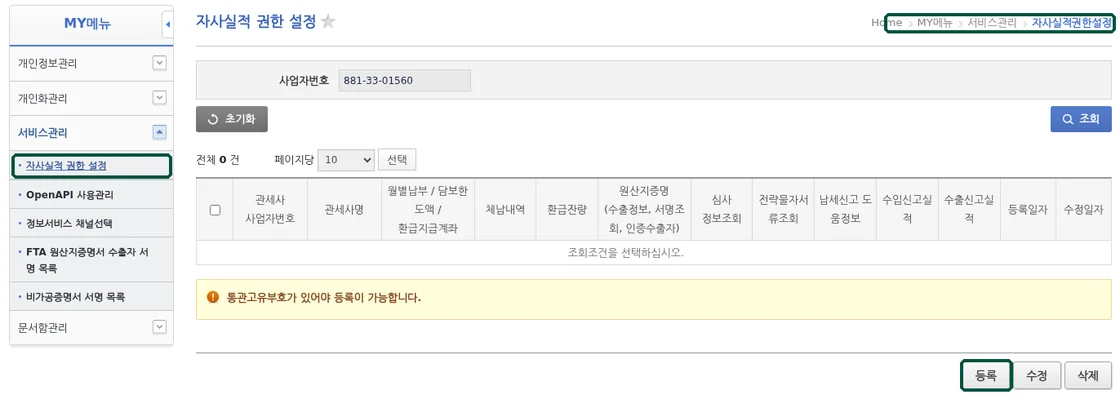
- Log in to UNI-PASS (unipass.customs.go.kr) with the exporter's account.
- Click My Menu at the top right of the screen, then open Service Management and Company Records Permission Settings in order from the left menu.
- Click the Register button at the bottom of the screen.
- Click the magnifying glass button in the Licensed Customs Broker business number field, search for the Licensed Customs Broker, and apply the search result. The business registration number of Ubis Customs Service is 881-33-01560.
- Under Setting Type, check Certificate of Origin.
- Click the Save button, and click OK in the window asking whether to save.
The certificate of origin permission includes export information, signature inquiry and approved exporter inquiry. After saving, click the Search button on the same screen and the registered Licensed Customs Broker appears in the list.
Other permission items and revoking a permission
In addition to certificate of origin, the company records permission settings list has the items monthly payment/security limit/refund payment account, arrears details, drawback balance, review information inquiry, strategic goods document inquiry, tax declaration assistance information, import declaration records and export declaration records. If you entrust only the issuance of certificates of origin, check only certificate of origin.
To change or revoke a permission, search on the same screen, select the row of the Licensed Customs Broker, and click the Edit or Delete button.
Source: UNI-PASS notice (posted by the Korea Customs Service on October 7, 2026, notice number 202610073004, titled How to set company permissions following the improvement of the FTA certificate of origin application form), Act on Special Cases of the Customs Act for the Implementation of Free Trade Agreements Article 11 (Preparation and issuance of certificates of origin, etc.), Article 10 of the Enforcement Rule of the same Act (Procedure for issuing certificates of origin for exported goods). Based on the UNI-PASS screen and the laws in force on October 16, 2026.